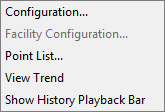
The Frame/The View has numerous Run mode options. To access available Run mode options, right-click on The Frame/The View in Run mode to open its context menu.
The following table lists and describes the controls available in Run mode for The Frame/The View. The options are enabled or disabled depending on the configuration in the Property Sheet.
| Option | Description |
|---|---|
|
Configuration |
Opens the View Configuration dialog box where you can view facility template information, units, update interval, and file property information for the screen. See View Configuration. |
|
Facility Configuration |
Opens the FAC Editor for viewing and/or editing facility properties. See Facility Service. Note: This option is only available if the Facility is specified in The Frame/The View Property Sheet. |
|
Point List |
Opens the Point List dialog box that lists all points configured on The Frame/The View. |
|
View Trend |
Displays a new dialog box showing the View’s default trend. See Default Trend Note: This option is only available if the Default Trend is configured in The Frame/The View Property Sheet. |
|
Show / Hide History Playback Bar |
Displays or hides the History Playback Bar on The Frame/The View. Note: This option is only available if the history playback bar is enabled in The Frame/The View Property Sheet. |
Properties for the Point List are configured on the Normal page of the Property Sheet. When the [PointList] property is selected, a Select Point Attributes dialog box opens. Users can select and de-select the options to be displayed in the Point List dialog box from the Select Point Attributes dialog box. Options include properties of the point configuration record (Description, Units, UDC, etc.), properties of the CVS point record (Value, Timestamp, etc.), and facility attributes (Facility Description, Facility ID, attributes). The default columns of the Point List are tag;value.
The Point List dialog box is viewed in Run mode from the context menu on The Frame/The View.
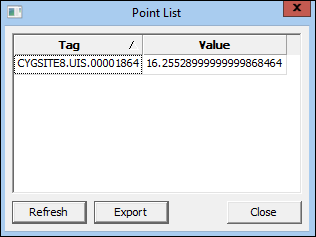
The following table lists and describes the buttons on the Point List dialog box.
| Option | Description |
|---|---|
|
Refresh |
Refreshes the point data displayed in the Point List pane. |
|
Export |
Click to export the point list to a .csv file. Opens a window to choose the file path. |
|
Close |
Closes the Point List dialog box. |

|
|
|

